Make the mic you own sound like a studio.

MicPRO cleans your voice in real time before it reaches OBS, Discord or the game. Fans and keyboard noise drop out, harsh "s" sounds soften, and every callout lands at the same level. Tuned presets for the Shure SM7B and Logitech G Pro X are built in.

Free and open source. Also on macOS and Linux. Everything runs on your PC; no account, no cloud.

Raw headset mic With MicPRO
Noise floor −42 dBNoise floor −78 dB

Drag across the waveform to compare the same take before and after processing.

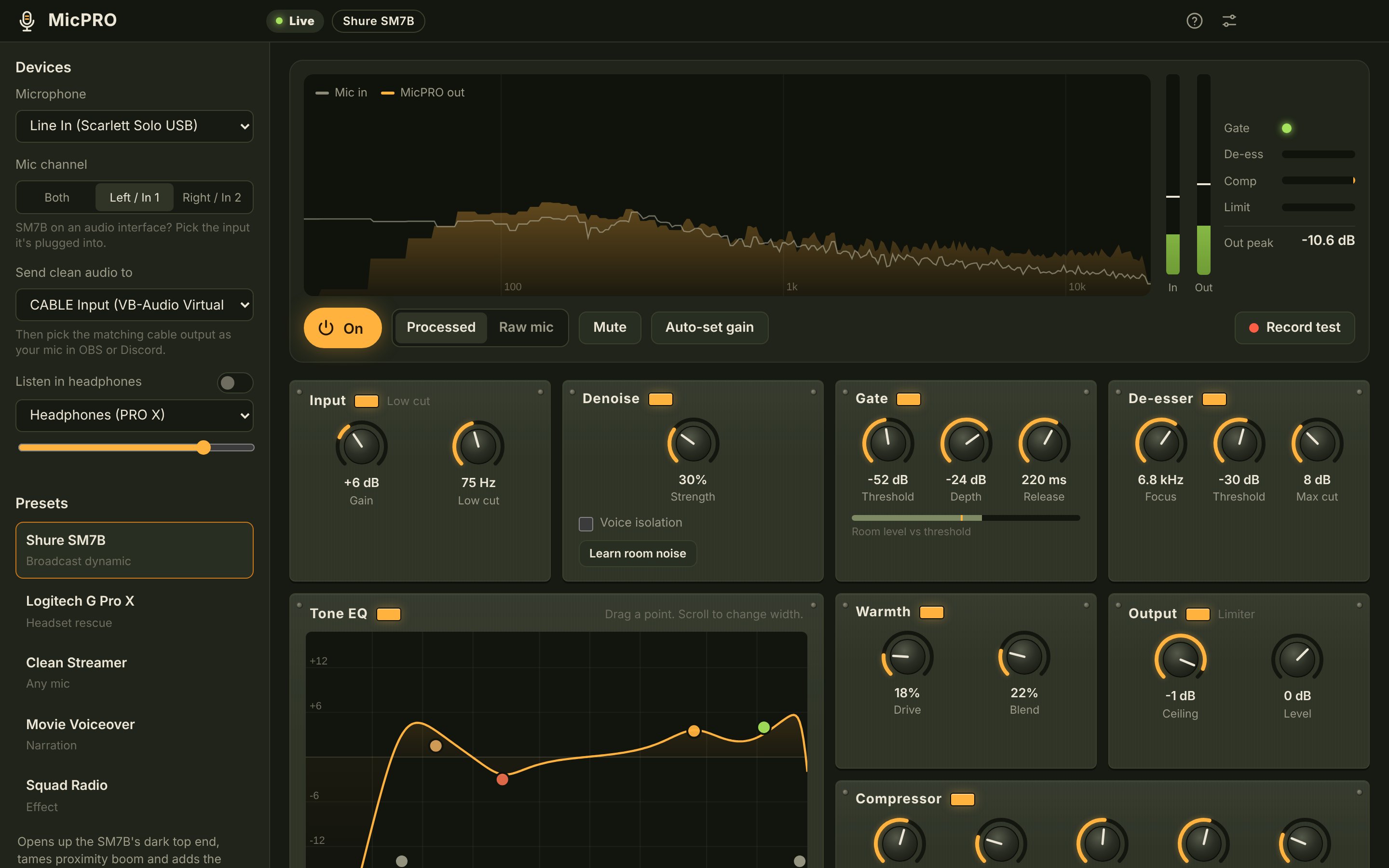
The MicPRO app: a live spectrum of the mic, level meters, and rack-style modules for denoise, gate, EQ, de-esser, warmth, compressor and output.

The whole chain on one screen: live spectrum, meters, and a rack you can tweak while you talk.

Seven stages, in the order a broadcast engineer would use them.

Each stage fixes one problem and hands a cleaner signal to the next. Turn any of them off, or let a preset set them for you.

  1. Denoise

    Learns the hum of your PC and room and pulls it out from under your voice.

  2. Gate

    Closes smoothly between sentences so keyboard clatter and breathing stay out.

  3. Tone EQ

    Cuts mud and boom, adds chest and clarity. Drag the curve to taste.

  4. De-esser

    Softens sharp "s" and "t" sounds without dulling the rest of your voice.

  5. Warmth

    Blends in gentle analog-style saturation for a fuller, richer tone.

  6. Compressor

    Evens out whispers and shouting so every callout sits at one level.

  7. Limiter

    A hard ceiling. When a firefight makes you yell, nothing clips.

Presets tuned for real mics.

Pick your mic and you're most of the way there. Every preset is a starting point you can adjust and save as your own.

Shure SM7B

Broadcast dynamic

The SM7B is warm and quiet but dark, and it needs a lot of gain. This preset brings back the top end, controls proximity boom when you lean in, and adds level.

Low cut
75 Hz, steep
EQ
−3 dB boxiness at 300 Hz, +3.5 dB presence at 4.2 kHz, +4 dB air above 11 kHz
Dynamics
3.5:1 compression, light gate, −1 dB limiter
Denoise
Light: the mic already rejects the room

Logitech G Pro X

Headset rescue

Headset boom mics sound thin, nasal and hissy. This preset denoises harder, gates tighter, puts body back under your voice and scoops out the honk.

Low cut
100 Hz
EQ
+4 dB body at 160 Hz, −3 dB nasal at 900 Hz, high cut at 14 kHz for hiss
Dynamics
4:1 compression, tight gate, −1 dB limiter
Denoise
Strong, plus voice isolation

Also included: Clean Streamer for any mic, Movie Voiceover for raid-edit narration, and Squad Radio for crunchy comms callouts in your videos.

Set up in three steps.

MicPRO sends its clean audio to a virtual cable. Your apps listen to that cable instead of the raw mic.

  1. Install MicPRO and VB-CABLE

    Grab MicPRO below and the free VB-CABLE driver. Restart your PC once.

  2. Route it

    In MicPRO, send clean audio to CABLE Input. In OBS, Discord or Tarkov, choose CABLE Output as your microphone.

  3. Pick a preset and record

    Choose your mic, press Auto-set gain and talk for five seconds. Record a test take to hear raw and processed back to back.

Download MicPRO

Version 1.0. Free and open source under the MIT license.

Windows may show a SmartScreen notice because the installer isn't code-signed yet. Choose More info, then Run anyway. All builds are on the releases page.

Questions

Does it add delay to my voice?

About 20 ms end to end, which nobody on comms will notice. In OBS you can set a small sync offset on your webcam if you want lips perfectly matched.

Can it really fix a headset mic?

It can't turn a headset into an SM7B, but it removes the things that make headset mics sound cheap: hiss, room noise, a thin low end and a nasal midrange. The difference in a raid video is obvious.

Does it work with Tarkov's in-game voice chat?

Yes. Set CABLE Output as the default recording device in Windows sound settings, or as the input in the game's audio settings, and every app hears the processed voice.

Should I keep Blue VO!CE or NVIDIA Broadcast on?

Turn them off while you use MicPRO. Stacking two noise reducers and two compressors makes a voice sound squashed and robotic.

Can I record my voiceover straight from MicPRO?

Yes. Record test saves a 24-bit WAV of the processed voice, and the raw mic alongside it, ready to drop into Premiere, Resolve or Vegas.

Does anything get uploaded?

No. All processing happens on your computer. MicPRO has no account, telemetry or cloud.